Last week I was looking around for a free service online to backup some important files. It's always good to keep a backup in case of an emergency. I've been using SkyDrive for a lot of my backups but it's limited to around 2GB. And then I found out about ADrive...
Showing posts with label free. Show all posts
http://www.ubit.ch/software/ubitmenu-languages/
Probably the largest influence I had growing up was watching (the now defunct) ZDTV/TechTV back when shows like The ScreenSavers, Call for Help, Silicon Spin, and Gamespot TV/Extended Play were on the air. I started watching around the time Leo Laporte and Kate Botello hosted The ScreenSavers, but I remember watching more shows with Leo Laporte & Patrick Norton. Eventually my cable provider dropped ZDTV shortly after it turned into TechTV.
These shows inspired me to persue a career in information technology. Everything from learning about HTML code to building my first custom PC, I owe to the crew over at ZDTV. There's still plenty of great tips/tricks/information on technology from these shows.
The hosts of the shows eventually moved on to other projects after ZDTV/TechTV got merged/canceled and are still out there today in the world of tech. The channel now exists as G4 but a good chunk of the crew work at Revision3 now.
I huge internet shout-out to the whole crew from ZDTV. I'd like to thank the following in particular for inspiring me the most: Roger Chang, Jessica Corbin, Yoshi DeHerrera, John C. Dvorak, Leo Laporte, Sarah Lane, Jim Louderback, Megan Morrone, Patrick Norton, Chris Prillo, Kevin Rose, Martin Sargent, Catherine Schwartz, Adam Sessler & Morgan Webb.
Leo Laporte has his own site called The TWiT Newscast network, operates a blog and has an archive of podcasts/radio shows @ TechGuyLabs.com:
http://twit.tv
http://techguylabs.com
http://leoville.com
http://www.amazon.com/Leo-Laporte/e/B001K8PZ3I/
http://twitter.com/leolaporte
Kate Botello operates a personal website, owns a theatre production company, a web design company, and runs a children's theater summer camp in Traverse City, Michigan:
http://www.katebotello.com
http://traversecitywebdesign.com/about
Patrick Norton currently hosts shows called HD Nation & Tekzilla on Revision3:
http://revision3.com/tekzilla
http://revision3.com/hdnation
http://www.twitter.com/patricknorton
The coolest nostalgia bomb that was dropped on me recently was when I re-discovered tons of old ZDTV clips online. You can check out a boatload of shows archived via these links or do a search online for more:
http://www.youtube.com/user/ZDTVMultimedia
http://www.livestream.com/desertbunker
http://www.youtube.com/user/zdtvfan
Bonus 1: Internet Archive of The ScreenSavers website:
http://discretionary.org/screensavers/index.php
Bonus 2: TechTV - How to build a website (hosted on archive.org)
http://www.archive.org/details/Daanbrg-TechTVHowToBuildAWebsite459

DownThemAll (or just dTa) is a powerful yet easy-to-use Mozilla Firefox extension that adds new advanced download capabilities to your browser.
DownThemAll lets you download all the links or images contained in a webpage and much more: you can refine your downloads by fully customizable criteria to get only what you really want.
DownThemAll is all you can desire from a download manager: it features an advanced accelerator that increases speed up to 400%, it allows you to pause and resume downloads at any time and, last but not least, it's fully integrated into your favorite browser!
http://www.downthemall.net
Download High Definition Videos off Youtube... and lot more!!
KeepHD is a sweet tool that lets you download HD videos off Youtube and other tube sites in to your video editing softare! Not only can you download from youtube HD copies of your movies and music, you can also download the mobile 3GP version for your mobile devices plus the standard MP4 and FLV format. Just enter your video URL, and KeepHD will automatically grab each version of the youtube video clip you want to download.
http://keephd.com

Not sure what programs you might need to update? Tried of having to look them up the old fashioned way? Try FileHippo Update Checker! It scans your computer for the programs you have installed and it will let you know what updates are available. The updates are displayed on a customized page for you and you can download your updates from FileHippo.
In this post I'll explain how to download and install inSSIDer.
1. In a Web browser enter the address http://www.metageek.net/products/inssider/download
2. When the File Download dialog box appears click Save.
3. After the program has downloaded click Open to begin the installation process.
4. Accept the default settings to install inSSIDer on your computer.
Source: Metageek.com – http://www.metageek.com/products/inssider
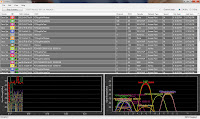
6. Depending on the number of wireless signals that inSSIDer picks up, your screen will look similar to the picture at the top of this article.
7. There are several sections and columns listed in the program window…
The Start/Stop Scanning Button will turn the program’s scanning feature on and off.
The drop down menu will allow you to select the network device you want to analyze.
The Channel Graph section will display either the 2.4 GHz or 5 GHz spectrum on the Signal Strength graphs below
Vendor lists the name of the device’s manufacturer. This is determined by the MAC Address of the device.
The check box will show/hide the device on your signal strength charts below. This becomes very useful when performing a site survey so that you can isolate specific devices.
MAC Address lists the physical address of the device that is broadcasting a wireless signal.
SSID is the name of the device.
Channel lists the frequency on which the device is operating.
RSSI means signal strength.
Source: Meta Geek Forums - http://www.metageek.net/forums/showthread.php?t=2968
Security displays the type of encryption (if any) that is currently implemented.
Network Type shows what the device is functioning as.
Speed lists the data rate of the device.
The First Seen & Last Seen columns display when the time when the device was in range.
Location displays GPS coordinates of the device.
Source: Meta Geek Forums – http://www.metageek.net/forums/showthread.php?t=2999
I found an awesome online file conversion website called Zamzar. You can upload files or send youtube links to their site and have them converted to other formats. Enter your email and they’ll send you a link to download your converted file.
This goes out to all of you who got a new computer back in December. You know that, shiny new laptop that has a copy of Office 2007 installed on it. If you didn't end up getting a license for that, it means your 60-day trial is either coming to an end or it has already expired. Good news for you, you can buy a license over at your local computer store or online at a site like Newegg.com - I highly recommend that you do not purchase a license unless it's from a well established retailer. You could get into trouble if you think you're getting a good deal by purchasing Office online through an auction site.
For those of you that either don't have the money for that yet or need a nice office suite to replace your expired Office suite, look no further!
OpenOffice is a nice office suite that'll get you where you need to go. Got a paper to write that's due but you can't use Office because your trial expired? Go to http://www.openoffice.org and download their FREE office suite that runs using Java. It's cross platform so for all you Linux users out there (I know you're out there) can take advantage of this too. 150MB download so be advised if you're on a slow connection, it might take a while to download.
And hey, are you borrowing a friend's computer and they don't want you installing anything on it? There's always OpenOffice Portable. You can get a copy and install it to a USB drive. Works like a charm! http://portableapps.com/apps/office/openoffice_portable
Note: Like the site says "99MB Download - 248MB installed" I'd advise installing to a least a 512MB USB drive so you can also have some space for your documents/presentations/spreadsheets if need be.
About Me
- technick.85
- United States
- Hark! I bring you treasures from the internet!
I'm fascinated with technology and what it has to offer. Being involved with technology in an educational environment, I've discovered a few interesting tips and tricks along the way.
Most of these entries are just my notes on issues I've had -
maybe you'll find my notes useful too?
Featured Videos
80GB!?!? That's out of control!
Meekakitty - Don't Unplug Me - All Caps
My Favorite Websites
Categories
- programs (13)
- free (9)
- microsoft (6)
- antivirus (3)
- backup (3)
- excel (3)
- guides (3)
- youtube (3)
- Internet Explorer (2)
- Windows 7 (2)
- discount (2)
- google (2)
- hardware (2)
- hoax (2)
- outlook (2)
- spam (2)
- wireless (2)
- APC (1)
- AVG (1)
- Cleanup (1)
- Dell Inspiron 1525 (1)
- IIS (1)
- Logging (1)
- OS X (1)
- Recovery (1)
- SBS2008 (1)
- Server (1)
- Sticky Notes (1)
- art (1)
- bandwidth (1)
- cloud (1)
- craigslist (1)
- csv (1)
- customers (1)
- customization (1)
- default passwords (1)
- disable (1)
- equations (1)
- firefox (1)
- hackintosh (1)
- iPC (1)
- inSSIDer rssi (1)
- linux (1)
- messenger (1)
- office (1)
- osx86 (1)
- pdf (1)
- phishing (1)
- reset (1)
- scam (1)
- storage (1)
- subscribers (1)
- symantec (1)
- text-to-speech (1)
- txt (1)
- ultimate steal (1)
- update (1)
- weather (1)
- website check (1)